2026-05-13 — Modern OpenSSH key auth fixed (libssh2 migrated to mbedTLS)
Public-key authentication regressed in v1.0.0.17 against modern OpenSSH servers (8.8+, including stock Ubuntu 24.04 / 26.04 with OpenSSH 10.x): the plugin silently fell back to password prompts even with valid
ed25519andRSAkeys.Root cause: bundled libssh2 was built against the Windows WinCNG crypto backend, which does not implement
ed25519,curve25519-sha256,AES-GCM, and crucially missed RFC 4251 mpint encoding for RSA public keys (gen_publickey_from_rsaskipped the leading-zero rule, so the SHA-256 fingerprint of the client-presented pubkey never matchedauthorized_keyswhen the modulus had its MSB set — roughly half of real RSA keys).Fixed by switching libssh2 to a statically linked mbedTLS 3.6.6 backend and patching three upstream libssh2 1.11.1 defects: (1) uninitialized
int retin_libssh2_mbedtls_pub_priv_keyreturning stack garbage as if it were an error code; (2) missing mpint leading-zero ingen_publickey_from_rsa; (3) RSA-SHA2 default upgrade in_libssh2_key_sign_algorithmwhen the server omitsserver-sig-algs. Plugin grew ~1 MB; still single-file, no DLLs, no VC++ Redistributable.ed25519,ECDSA,AES-GCM,curve25519-sha256,mlkem768x25519all work end-to-end now.2026-03-24 — LAN Pair TrustedInstaller + Language override
TrustedInstaller impersonation is now correctly applied on every LAN Pair connect. On the Donor (server) side, incoming Receiver connections are served under TI impersonation — granting read/write access to
C:\Windows\and other system-owned files. On the Receiver (client) side, a TI RAII scope wraps local file access during transfers, enabling download to and upload from TI-protected local paths. DPAPI trust keys now useCRYPTPROTECT_LOCAL_MACHINEfor TI-compatible decryption. Language override: addLanguage=to[Configuration]insftpplug.inito force the plugin UI language (e.g.Language=finfor a custom Finnish translation). Custom.lngfiles are fully supported — any value not matching a built-in code is loaded aslanguage\<value>.lngfrom the plugin directory. A configuration templatesftpplug.tplis now included in the package.2026-03-22 — LAN Pair auto-pairing wizard (60-second countdown)
The Auto role in LAN Pair mode now shows a guided 60-second countdown dialog instead of a silent one-shot attempt. The plugin starts listening in the background and waits up to 60 s for a peer to appear. When found, a Donor / Receiver / Cancel prompt appears. On timeout or Cancel, the receiver is stopped automatically — no orphaned open ports. UDP broadcast interval extended from 1.5 s to 2 s for improved stability. All new strings fully localized (15 languages).
2026-03-21 — PHP Agent TAR batch download + sftp.php update required
Users with the TAR stream option enabled may have experienced silent batch download failures (0 files), HTTP 504 timeout on OVH / home.pl, or upload failures for archives exceeding 4 GB.
All three are now fixed. Upload the updatedsftp.phpfrom the plugin directory to your server before using TAR batch download.2026-03-13 — Visual C++ Redistributable dependency removed
Previous builds reported "Error loading plugin file! The plugin probably needs some DLLs missing" on clean systems. Fixed:
argon2andlibssh2rebuilt from source with/MT(static CRT). No external DLLs required.
Secure FTP Plugin for Total Commander
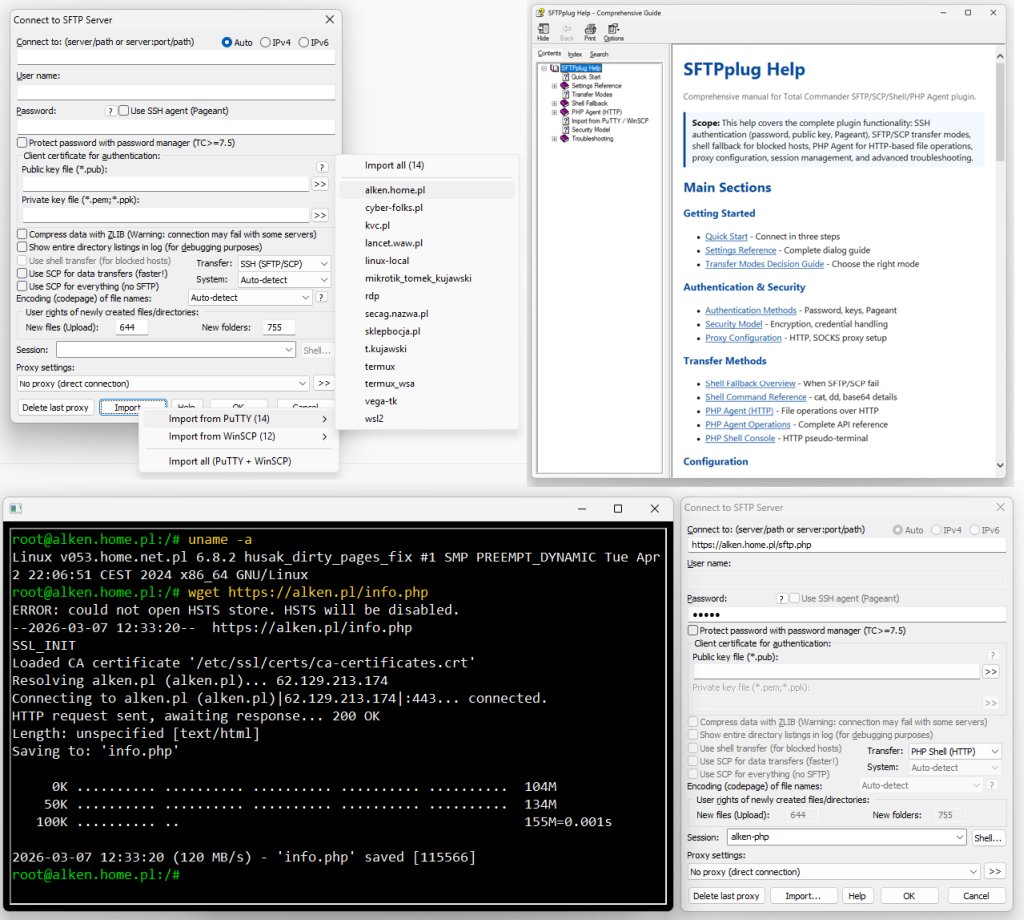
📚 Table of Contents
- Feature Overview
- Architecture
- File Transfer Capabilities
- Authentication System
- Security & Password Storage
- Connection Management
- PHP Agent — TAR Batch Transfers
- PHP Shell — Command History
- Module Map
- Source Tree (Local Repo)
- System Requirements
- PHP Agent Deployment
- Localization & Build Modes
- Roadmap
Feature Overview
This plugin is a complete C++20 rewrite of the original SFTP plugin by Christian Ghisler (creator of Total Commander). The original C implementation served as the foundation, but has been completely re-engineered with modern C++ patterns, enhanced security features, and extended functionality.
This plugin targets Total Commander on Windows x64 and x86 and provides comprehensive secure file transfer capabilities:
Core Transfer Protocols
- SFTP (primary) with resume support and streaming transfers
- SCP (native) with >2GB file detection for 64-bit servers
- Shell Transfer Fallback (DD/base64) for restricted hosts blocking SFTP/SCP
- Jump Host / ProxyJump for bastion-routed SSH access without external
ssh.exe - PHP Agent (HTTP) standalone transfer mode for hosts without SSH account access; directory uploads and batch file downloads transferred as a single TAR stream (opt-in via
php_tarcheckbox) — replaces thousands of individual HTTP requests with one POST/GET - PHP Shell (HTTP) pseudo-terminal for command execution via the same single-file agent — with persistent command history (Up/Down arrows, 128-entry ring buffer, stored in
%APPDATA%\GHISLER\shell_history.txt) - LAN Pair direct Windows-to-Windows pairing mode; Donor role runs as file server (waits for incoming Receiver), Receiver role connects as client; Auto role shows a 60-second guided pairing wizard — finds the peer, prompts connect-as-Receiver or stay-as-Donor, stops cleanly on timeout; optional TrustedInstaller impersonation for system-protected file access on both sides
Authentication Methods
- Password authentication with Keyboard-Interactive support
- Public key authentication (PEM/OpenSSH format)
- Native PPK v2/v3 decoding without external tools
- Pageant (SSH Agent) integration with auto-launch
Advanced Features
- Session import from PuTTY and WinSCP registry; PuTTY Portable folder (auto-finds
putty.regrecursively) and WinSCP.ini file - KiTTY Portable import — auto-finds
Sessionsfolder recursively; stored passwords automatically decrypted and saved as DPAPI - Comprehensive proxy support (HTTP CONNECT, SOCKS4/4a/5)
- Remote checksum calculation (MD5, SHA1, SHA256, SHA512)
- Automatic UTF-8 and line ending detection
- Host key fingerprint verification
- Built-in CHM help (
sftpplug.chm) available from the plugin dialog via the Help button - External
.lngfile localization — 15 languages (EN/PL/RU/DE/FR/ES/IT/CS/HU/NL/PT-BR/RO/SK/UK/JA/ZH-CN) — dynamic dialog translation at runtime, auto-detected from TCwincmd.ini, language-aware control layout (ArrangeInlineRow)
Design Priorities
- Practical interoperability on heterogeneous SSH servers
- Deterministic failure behavior (timeouts, cleanup, no hidden loops)
- Modern C++ architecture with RAII and interface abstraction
- Zero external dependencies — libssh2 and Argon2 both rebuilt from source with
/MT(static CRT), no VC++ Redistributable required
Architecture
Layered Structure
WFX API Layer
  ↓
Plugin Entry Points (FsFindFirst/FsGetFile/FsPutFile/FsExecuteFile/...)
  ↓
┌─────────────────────────────────────────┐
│  Business Logic Layer                   │
│  ├─ ConnectionNetwork / ProxyNegotiator │
│  ├─ ConnectionAuth / SessionPostAuth    │
│  ├─ SFTP / SCP / Shell fallback         │
│  ├─ PHP Agent (HTTP) / PHP Shell        │
│  └─ UI Separation (IUserFeedback)       │
└─────────────────────────────────────────┘
  ↓
ISshBackend Interface (ISshSession/ISshChannel/ISftpHandle)
  ↓
Libssh2Backend Implementation (libssh2)
ABI Exception Barrier
Every exported Fs* function is wrapped by DllExceptionBarrier — a stack-local RAII firewall that prevents any C++ exception from crossing the ABI boundary into Total Commander (which would crash the host immediately):
- Exception caught → current operation aborted, error code returned to TC
- Stack trace captured via Windows DbgHelp (
CaptureStackBackTrace+SymFromAddr), SRWLOCK-serialised, lazy-initialized - Exception stored as
std::exception_ptrwithout RTTI (/GR-build) - User sees a
MessageBoxWwith error type and call location - TC continues running — a plugin bug cannot crash the host process
Why This Architecture Matters
Backend Abstraction via ISshBackend
Polymorphic interfaces (ISshSession, ISshChannel, ISftpHandle) decouple the plug-in from direct libssh2 calls. This enables:
- Future backend migration without rewriting business logic
- Potential multi-backend support (libssh2, libssh, etc.)
- Easier unit testing via mock implementations
RAII Memory Management
Extensive use of std::unique_ptr for session/channel objects and handle_util::AutoHandle<HANDLE> for Windows file handles. ConnectionGuard RAII in PluginEntryPoints.cpp ensures new connections are always cleaned up on any error path in FsFindFirstW — no resource leaks even on early returns or exceptions.
UI Separation via IUserFeedback
The IUserFeedback pattern (implemented by WindowsUserFeedback) separates transfer/connection logic from MessageBox dialogs, improving background thread stability in Total Commander's multi-threaded environment.
Connection Lifecycle
Operational Requirements:
- No unbounded EAGAIN loops
- Readiness checks in all network loops
- Stage timeout per critical phase (connect/auth/read)
- Cleanup on every failing exit path
File Transfer Capabilities
Standard SFTP & Native SCP
| Feature | Description |
|---|---|
| SFTP Protocol | Full support for downloading/uploading via SFTP subsystem |
| SCP Protocol | Native SCP for servers without SFTP |
| Transfer Resume | Resume interrupted SFTP transfers |
| Encoding Detection | Auto-detect UTF-8 and line endings (CRLF vs LF) |
| Permissions | Remote chmod for file permissions |
| Timestamps | touch command support via SCP console |
Shell DD / Base64 Fallback (New!)
Advanced workaround for servers with blocked SFTP subsystem and unavailable scp command. Uses hidden interactive channel for transfers.
Upload Path:
- Split local data into chunks
- Base64 encode each chunk
- Send via
printf '%s' | base64 -dthrough shell channel - Decode and append server-side
Download Path:
- Try fast path via
cat - Fallback to
base64 -w 0when needed - Incremental decode (streaming, no full-file buffering)
Throughput Note: Base64 adds ~33% overhead. Native SFTP/SCP is faster. Shell fallback is compatibility-first, not speed-first.
SCP > 2GB File Support
| Detection Method | Implementation |
|---|---|
| 64-bit Server Check | file and which scp commands |
| Transfer Mode | Automatic adjustment for large files |
| Fallback | Shell transfer if SCP limit detected |
Remote Checksum Support
Calculate file hashes directly on the server without local computation:
| Algorithm | Command |
|---|---|
| MD5 | md5sum / md5 -q |
| SHA1 | sha1sum / sha1 -q |
| SHA256 | sha256sum / shasum -a 256 |
| SHA512 | sha512sum / shasum -a 512 |
Authentication System
Supported Methods
- Password - Traditional password authentication
- Keyboard-Interactive - With password change request handling
- PEM (OpenSSH) - Traditional private key format
- PPK v2/v3 - Native PuTTY format decoding (New!)
- Pageant - SSH Agent integration
Native PPK v2 & v3 Decoder
Native parsing of PuTTY Private Key files without external tools or DLLs — Argon2 is statically compiled into the plugin:
| Component | PPK v2 | PPK v3 |
|---|---|---|
| Key Derivation | SHA-1 based (BCrypt) | Argon2d/i/id (BCrypt + built-in Argon2) |
| Encryption | AES-256-CBC | AES-256-CBC |
| MAC Validation | HMAC-SHA-256 | HMAC-SHA-256 |
| Output Format | Traditional PEM for libssh2 | Traditional PEM for libssh2 |
| External DLL | None needed | None needed — Argon2 statically linked with /MT |
Authentication Fallback Strategy
Key-Path Validation (Fail-Fast)
| Condition | Behavior |
|---|---|
Missing privkeyfile |
Immediate local error (no fallback stall) |
Missing pubkeyfile (explicit) |
Immediate local error |
| Invalid PPK format | Precise error with MAC/KDF details |
This avoids minute-long UI freezes on impossible auth attempts.
Pageant Integration
- Full integration with PuTTY Pageant
- Auto-launch
pageant.lnkwhen needed - Seamless fallback to file-based auth if agent unavailable
Security & Password Storage
Storage Modes
| Mode | Format | Description |
|---|---|---|
| TC Master | password=! |
TC CryptProc API |
| DPAPI | password=dpapi:... |
Windows DPAPI |
| Plaintext | password=plain:... |
Explicit marker |
| Legacy XOR | (legacy) | Read-only compat |
Security Enhancements
| Feature | Implementation |
|---|---|
| Primary Encryption | DPAPI (CryptProtectData) |
| TC Integration | CryptProc API when available |
| Legacy Support | XOR read-only (compatibility) |
| PPK v3 Keys | Argon2 key derivation |
| Memory Handling | Secure zeroing of sensitive buffers |
Connection Management
Session Import (New!)
Import configurations from multiple sources:
| Source | Method |
|---|---|
| PuTTY (installed) | HKCU\Software\SimonTatham\PuTTY\Sessions registry |
| WinSCP (installed) | HKCU\Software\Martin Prikryl\WinSCP 2\Sessions registry |
| PuTTY Portable | Folder picker → auto-finds putty.reg recursively (up to 4 levels), parses and converts to INI on the fly |
| WinSCP Portable | File picker → reads WinSCP.ini directly |
| KiTTY Portable | Folder picker → auto-finds Sessions folder recursively (up to 4 levels); individual session files; only SSH sessions imported; stored passwords decrypted and saved as DPAPI |
Import Features:
- Non-conflicting conversion to plugin INI format
- Preserves connectivity fields (host, port, user, keys)
- KiTTY passwords — automatically decrypted via
dp.exe(embedded as LZX CAB RCDATA resource; extracted on first use via Windows FDI API; Defender path and process exclusion added before extraction via WMI/COM — no PowerShell) - Checkbox picker dialog — select any combination of sessions and import in one step
- 4-path memory — the last 4 used folder/file paths are remembered and pre-selected on next open
- No auto-connect side effects during import
Proxy Support
| Type | Authentication |
|---|---|
| HTTP CONNECT | Basic auth |
| SOCKS4 | None |
| SOCKS4a | None |
| SOCKS5 | None / Username-Password |
LAN Pair — ports and trust model
| Port | Protocol | Purpose |
|---|---|---|
| 45845 | UDP broadcast | Peer discovery (2 s interval) |
| 45846 | TCP | Pairing handshake + file transfer |
Authentication uses TOFU (Trust On First Use):
- First connection: pairing password required on both sides; key derived via PBKDF2-HMAC-SHA256 (120,000 iterations)
- Trust token stored encrypted via Windows DPAPI per peer-pair and Windows user account
- Subsequent connections: automatic — no password prompt
Both ports must be allowed in Windows Firewall on both machines. UDP broadcast is blocked between VLANs/subnets by default.
LAN Pair Roles
| Role | INI value | Behavior |
|---|---|---|
| Auto | lanpairrole=0 |
Guided 60-second wizard — starts local file server, waits for peer, then prompts: connect immediately (Receiver/client) or stay as Donor/server |
| Receiver | lanpairrole=1 |
Client mode — connects to the Donor's file server. Does not start a local server. Use this on the machine that will browse files from the Donor. |
| Donor | lanpairrole=2 |
Server mode — starts the local LAN Pair file server and waits for an incoming Receiver connection. Does not initiate outgoing connections. Use this on the machine whose files you want to access remotely. |
Which role for which machine? The Donor is the machine that has the files — it runs as server and waits. The Receiver is the machine that connects and browses — it acts as client. Both machines must run Total Commander with this plugin.
TrustedInstaller Impersonation
The Trusted Installer checkbox in the LAN Pair connection settings lets the file server impersonate the Windows TrustedInstaller service account, granting access to system-protected files (e.g. C:\Windows\, C:\Program Files\WindowsApps\).
| Role | Effect |
|---|---|
| As Donor (server) | Incoming Receiver connections are served under TI impersonation — the Receiver can read, write, delete, and rename TI-owned files on this machine |
| As Receiver (client) | File transfers run under TI impersonation locally — you can download files to TI-protected local directories and upload files from TI-protected local paths |
To work with TI-protected files on the remote machine (the Donor), the checkbox must be enabled on the Donor's connection profile.
Requirements: TC must be running with SeDebugPrivilege (standard elevated Administrator token); the TrustedInstaller Windows service must be startable (the plugin starts it automatically if needed).
DPAPI note: Trust keys are stored via
CryptProtectDatawithCRYPTPROTECT_LOCAL_MACHINE— this ensures the key is decryptable in any impersonation context, including TrustedInstaller, without binding to a specific Windows user session.
Auto-Pairing Wizard
When the role combo is set to Auto and the user clicks Pair…, the plugin starts a guided wizard:
- Receiver listening immediately —
PairServerstarts on TCP 45846 in the background. - 60-second countdown dialog — a modal "Searching for LAN Pair peer on local network…" window with a live seconds counter and a Cancel button.
- Peer detected — the countdown closes automatically; a role-selection prompt appears:
- Yes — connect to the discovered peer immediately (this machine acts as Receiver / client).
- No — stay as Donor / server; the local file server keeps running.
- Cancel — server stopped, status bar updated.
- Timeout or Cancel — receiver stopped automatically. No orphaned open ports.
All dialog text is loaded from the external .lng file — fully localized in all 15 supported languages.
Network Features
- IPv4 / IPv6 dual-stack support
- Custom port configuration
- Host key verification with fingerprint storage
- Jump Host / ProxyJump for SSH targets behind bastion hosts
- First-time connection warnings
- Fingerprint changed alerts
Shell Engineering Highlights
Marker-Aware SCP Parsing
Real-world SSH servers differ in shell behavior. KVC handles edge cases:
| Technique | Purpose |
|---|---|
__WFX_LIST_BEGIN__ |
Directory listing start marker |
__WFX_LIST_END__ |
Directory listing end marker |
echo $? |
Exit code detection |
| Defensive parsing | Skip echoed commands/prompts |
Restricted Shell Handling
| Scenario | Solution |
|---|---|
| Blocked SFTP | Shell transfer fallback |
No scp command |
cat / dd / base64 |
| Noisy prompts | Buffer filtering |
| Delayed output | Staggered read timeouts |
PHP Agent — TAR Batch Transfers
When the TAR stream checkbox is enabled in the connection profile, all directory copies and batch file transfers use a single TAR HTTP round-trip instead of individual PUT/GET requests. This eliminates per-request overhead critical on shared hosting (OVH, home.pl) where even small files cost a full HTTP round-trip.
Batch Download (TAR_PACK)
TC's FsStatusInfo GET_MULTI / GET_MULTI_THREAD session is intercepted — each FsGetFileW call queues the remote path into TarDownloadSession. When the batch ends, a single POST to ?op=TAR_PACK is sent with all remote paths (newline-separated in the body). The server streams the ustar TAR directly to php://output with no buffering. The plugin parses the TAR on the fly, writing files as each entry arrives.
Batch Upload (TAR_EXTRACT)
TC's FsStatusInfo PUT_MULTI / PUT_MULTI_THREAD session is used to collect all files. The plugin runs a first pass to compute the exact total size, then streams the complete POSIX ustar TAR in a single WinHTTP POST to ?op=TAR_EXTRACT. Content-Length is sent as a proper 64-bit header value — no overflow for archives exceeding 4 GB. The server script extracts files on-the-fly — no temporary files created on the server.
Both directions support GNU LongLink (././@LongLink) for paths longer than 99 characters. Files exceeding 8 589 934 591 bytes (POSIX ustar octal limit) are skipped cleanly without corrupting the rest of the archive.
| Operation | HTTP | Body |
|---|---|---|
TAR_PACK |
POST | Newline-separated relative paths |
TAR_EXTRACT |
POST | ustar TAR stream with Content-Length |
TAR_STREAM |
GET | — |
PHP Shell — Command History
The PHP Shell console (PHP Shell (HTTP) mode) maintains a persistent command history that survives session restarts and plugin reloads.
Navigation
| Key | Action |
|---|---|
↑ Up arrow |
Recall previous command |
↓ Down arrow |
Move forward through history (↓ past the last entry clears the input line) |
Storage location
%APPDATA%\GHISLER\shell_history.txtThis is the same directory Total Commander uses for its own configuration. The file is plain UTF-8, one command per line, and can be opened in any text editor.
Capacity — ring buffer
The file holds a maximum of 128 entries. When the 129th command is added, the oldest entry is dropped from the top. The file is always rewritten in full on each addition — at 128 short lines this is negligible I/O and eliminates any risk of stale data from a partial write.
Duplicate suppression
Consecutive identical commands are not recorded (equivalent to bash HISTCONTROL=ignoredups). Running the same command twice in a row stores it only once.
Clearing history
History can be cleared from inside the shell console without leaving it:
history -cor equivalently:
clear historyBoth commands erase all entries from memory and delete shell_history.txt from disk immediately. The cursor resets to an empty state. This is the recommended way to clear sensitive command traces — for example, after a password was typed inline by mistake.
Note:
exitandlogoutclose the console window but do not clear history — existing entries are preserved for the next session.
Crash and power-loss safety
Each write uses an atomic two-step pattern:
- New content is written to a temporary file (
shell_history.txt.tmp) in the same directory. MoveFileExAwithMOVEFILE_REPLACE_EXISTINGrenames the temp file over the real file.
On NTFS, a rename within the same volume is a single metadata operation. If power is lost between steps 1 and 2, the previous shell_history.txt remains intact — it is never truncated or partially overwritten. The worst-case outcome is a leftover .tmp file containing the most recent history, which can be renamed manually if needed.
Module Map (for Maintainers)
| Module | Responsibility | Notes |
|---|---|---|
| PluginEntryPoints.cpp | TC WFX API entry points | ConnectionGuard RAII; every Fs* wrapped via dll_invoke |
| DllExceptionBarrier.cpp | C++ exception firewall at ABI boundary | DbgHelp stack trace; lazy init; SRWLOCK-serialised |
| SftpConnection.cpp | High-level connection orchestration | Split from legacy monolith |
| ConnectionNetwork.cpp | Socket + low-level network path | Isolated network stage |
| JumpHostConnection.cpp | Bastion login + direct-tcpip tunnel setup | Dedicated ProxyJump path |
| ProxyNegotiator.cpp | HTTP/SOCKS proxy negotiation | Dedicated proxy module |
| SshSessionInit.cpp | SSH session bootstrap | Modular session init |
| ConnectionAuth.cpp / SessionPostAuth.cpp | Auth + post-auth session steps | Split auth lifecycle |
| ConnectionDialog.cpp | Connect dialog and UI handlers | UpdateCertSectionState — unified cert section for all transport modes |
| SftpAuth.cpp | Auth helpers, key-mode selection | Native PPK-aware flow |
| ScpTransfer.cpp | Native SCP transfer path | Dedicated SCP engine |
| ShellFallbackTransfer.cpp | Shell DD/base64 fallback transfer | Compatibility-first fallback |
| SftpTransfer.cpp | Native SFTP transfer path | Streaming buffers; ATTR_SIZE resume fix |
| SftpRemoteOps.cpp | Listing, remote file operations | Marker-aware parsing; SftpSetAttr (chmod) |
| SftpShell.cpp | Shell channel execution | EAGAIN loop guards |
| TransferUtils.cpp | Progress, rate, transfer helpers | Shared transfer utility layer |
| PhpAgentClient.cpp | PHP Agent HTTP operations (WinHTTP); TAR batch upload (TarUploadSession, PhpAgentUploadDirAsTar); TAR batch download (TarDownloadSession, PhpAgentDownloadFilesAsTar) |
PROBE / LIST / GET / PUT / MKDIR / REMOVE / RENAME / CHMOD / STAT / TAR_STREAM / TAR_EXTRACT / TAR_PACK |
| KittyDecryptDeploy.cpp | Embeds dp.exe as CAB RCDATA resource; deploys on first use via FDI; adds Defender path+process exclusion via WMI/COM |
KittyDecryptDeploy.h |
| PhpShellConsole.cpp | PHP Shell pseudo-terminal; keyboard input, Tab completion, Up/Down history navigation | Drives ShellHistory for persistence |
| ShellHistory.cpp | Persistent command history — ring buffer (128 entries), atomic NTFS write, %APPDATA%\GHISLER\shell_history.txt |
ShellHistory.h; history -c / clear history handlers |
| SessionImport.cpp | PuTTY/WinSCP/KiTTY import; KiTTY password decryption via dp.exe |
Registry → INI conversion; DPAPI password save |
| PpkConverter.cpp | PPK v2/v3 → PEM conversion | BCrypt + Argon2 statically linked |
| PasswordCrypto.cpp | DPAPI encrypt/decrypt, legacy XOR read | DataBlob RAII; SecureZeroMemory |
| Libssh2Backend.cpp | SSH backend implementation | ISshBackend interface |
| LanPair.cpp | PAIR1 auth, UDP discovery, PBKDF2 | TOFU trust; DPAPI key storage |
| LanPairSession.cpp | LAN2 command protocol, file transfer | noexcept API; session timeout enforcement |
| WindowsUserFeedback.cpp | UI separation | IUserFeedback pattern |
| CoreUtils.cpp | Utility functions (base64, time, strings) | Self-contained, no external deps |
| FtpDirectoryParser.cpp | Directory listing parser | Unicode-aware; December month fix |
Source Tree (Local Repo)
Current local layout (without publishing source code):
build.ps1                  # Build script at project root
bin/
  SFTPplug.zip             # Only output after build (intermediate dirs removed)
build/
  SFTPplug.vcxproj
  SFTPplug.sln
  SFTPplug.vsprops
src/
  agent/
    sftp.php
  core/
    DllExceptionBarrier.cpp
    Connection*.cpp
    JumpHostConnection.cpp
    LanPair.cpp / LanPairSession.cpp
    ProxyNegotiator.cpp
    SshSessionInit.cpp
    Sftp*.cpp
    ScpTransfer.cpp
    ShellFallbackTransfer.cpp
    PpkConverter.cpp
    PasswordCrypto.cpp
    ...
  help/
    *.html                 # CHM source (compiled to src/help/sftpplug.chm)
    sftpplug.hhp/hhc/hhk
    readme.txt
  include/
    DllExceptionBarrier.h
    ISshBackend.h
    ...
  res/
    sftpplug.rc            # EN/PL/DE/FR/ES string tables
    kitty-decrypt.cab      # dp.exe packed as LZX CAB (RCDATA resource)
System Requirements
| Component | Requirement |
|---|---|
| Operating System | Windows 7 or later (10/11 recommended) |
| Total Commander | Version 9.0 or later (x64 or x86) |
| Architecture | x64 (SFTPplug.wfx64) and x86 (SFTPplug.wfx) |
| Compiler | Visual Studio 2026 (v145 toolset), C++20 |
| Dependencies | libssh2 1.11.1 (mbedTLS 3.6.6 backend, three local patches) + Argon2 — all rebuilt from source with /MT; supports ed25519 / ECDSA / curve25519-sha256 / AES-GCM |
| External DLLs | None — fully static CRT, no VC++ Redistributable required |
| Windows APIs | BCrypt, DPAPI (CryptProtectData), WinHTTP, DbgHelp, Winsock2 |
Packaging
Distribution package contents:
| File | Purpose |
|---|---|
SFTPplug.wfx64 |
x64 plugin binary (libssh2 + Argon2 statically linked, /MT) |
SFTPplug.wfx |
x86 plugin binary (libssh2 + Argon2 statically linked, /MT) |
pluginst.inf |
Total Commander auto-install descriptor (file= x86, file64= x64) |
sftp.php |
Single-file PHP agent for HTTP transfer and shell modes |
SFTPplug.chm |
Full offline help (also opened via plugin Help button) |
readme.txt |
Package notes |
sftpplug.tpl |
Configuration template — copy to sftpplug.ini in the plugin directory to enable Language= override and other [Configuration] settings |
language\pol.lng |
Polish |
language\rus.lng |
Russian |
language\deu.lng |
German |
language\fra.lng |
French |
language\esp.lng |
Spanish |
language\ita.lng |
Italian |
language\cs.lng |
Czech |
language\hu.lng |
Hungarian |
language\nl.lng |
Dutch |
language\pt-br.lng |
Brazilian Portuguese |
language\ro.lng |
Romanian |
language\sk.lng |
Slovak |
language\uk.lng |
Ukrainian |
language\ja.lng |
Japanese |
language\zh-cn.lng |
Simplified Chinese |
Primary release archive: SFTPplug.zip — no external DLLs required, no VC++ Redistributable needed.
Open it directly in Total Commander and press Enter to trigger the plugin install prompt. TC will automatically install the correct architecture.
PHP Agent Deployment
The release package ships sftp.php — a single-file agent used by both PHP Agent (HTTP) and PHP Shell (HTTP) modes.
Important: The shipped
sftp.phphas no password configured. Uploading it before saving a session will result in HTTP 503 on every request. Always follow the order below.
Step 1 — Configure and save the session
Open the plugin connection dialog in Total Commander (Net → Connect). Fill in:
| Field | Value |
|---|---|
| Connect to | Full URL to sftp.php, e.g. https://example.com/sftp.php |
| Transfer mode | PHP Agent (HTTP) or PHP Shell (HTTP) |
| Password | Your chosen shared secret |
| Session name | Any label, e.g. My Hosting |
Click Save. The plugin writes a salted SHA-256 hash (AGENT_PSK_SALT + AGENT_PSK_SHA256) into the local sftp.php in the plugin directory. The password itself is never stored in the file.
Step 2 — Upload the modified sftp.php
Copy the local file (now containing your hash) to your server:
...\Total Commander\plugins\wfx\SFTPplug\sftp.php → https://example.com/sftp.phpDo not upload the original from the download package — it has empty PSK fields.
Step 3 — Verify the endpoint
Open https://example.com/sftp.php?op=PROBE in your browser:
| Response | Meaning |
|---|---|
HTTP 200 {"status":"ok"} |
Ready — proceed to connect |
| HTTP 401 Unauthorized | Script running, awaiting auth — also OK |
| HTTP 503 Service Unavailable | PSK not configured — wrong file uploaded; repeat from Step 1 |
| HTTP 404 Not Found | Wrong URL or file not uploaded yet |
Step 4 — Connect
Select the saved session in Total Commander and connect.
Security model
| Location | Stored | Password exposed? |
|---|---|---|
sftpplug.ini (your PC) |
Password encrypted with Windows DPAPI | No |
sftp.php (server) |
AGENT_PSK_SALT + SHA-256(salt + password) |
No — one-way hash |
| Network (HTTPS) | HMAC-SHA256 signature + timestamp + nonce per request | No — signature only |
Even if someone reads sftp.php on the server, the original password cannot be recovered.
Localization & Build Modes
Language files
UI strings are stored in external UTF-8 text files (language\*.lng) shipped alongside the plugin binary. English strings remain embedded in the binary as fallback; all other languages are loaded at runtime from .lng files.
| File | Language |
|---|---|
| (binary) | English (US) — built-in fallback |
language\pol.lng |
Polish |
language\rus.lng |
Russian |
language\deu.lng |
German |
language\fra.lng |
French |
language\esp.lng |
Spanish |
language\ita.lng |
Italian |
language\cs.lng |
Czech |
language\hu.lng |
Hungarian |
language\nl.lng |
Dutch |
language\pt-br.lng |
Brazilian Portuguese |
language\ro.lng |
Romanian |
language\sk.lng |
Slovak |
language\uk.lng |
Ukrainian |
language\ja.lng |
Japanese |
language\zh-cn.lng |
Simplified Chinese |
Runtime language detection
On startup the plugin reads HKCU\Software\Ghisler\Total Commander\IniFileName to locate wincmd.ini, then reads LanguageIni from the [Configuration] section (e.g. WCMD_POL.LNG → Polish, WCMD_CZ.LNG → Czech, WCMD_JP.LNG → Japanese). The matched language ID selects the correct .lng file.
This means the plugin automatically follows Total Commander's active UI language without any plugin-specific setting.
Language override (sftpplug.ini)
To force the plugin to a specific UI language regardless of Total Commander's active language, add a Language= key under [Configuration] in sftpplug.ini:
[Configuration]
Language=fin
Accepted values include any built-in language name or ISO code: en, pl, de, fr, es, it, ru, cs, hu, nl, pt-br, ro, sk, uk, ja, zh-cn. Any value that does not match a built-in code is treated as a filename stem — the plugin loads language\<value>.lng from the plugin directory. This enables custom translations (e.g. Finnish, Turkish) without modifying the plugin binary.
The plugin directory is usually %APPDATA%\Roaming\GHISLER\ (per-user roaming install) or <TC folder>\plugins\wfx\SFTPplug\. To find the exact path: TC → Configuration → Options → General, look for the Ini file location.
A pre-configured template sftpplug.tpl is included in the package. Copy it to sftpplug.ini in the plugin directory if no configuration file exists yet, and edit from there.
Dynamic dialog translation
All dialog labels, group boxes, checkboxes, and buttons are translated at runtime via SetDlgItemTextW inside WM_INITDIALOG. Every translatable control has a unique ID assigned in the RC file so it can be addressed individually.
Language-aware control layout (ArrangeInlineRow)
The Jump Host row (label + checkbox + button) is repositioned dynamically based on actual rendered text width. Russian text ("Использовать промежуточный хост") is significantly longer than English or Polish — ArrangeInlineRow measures pixel width via GetTextExtentPoint32W and places each control immediately after the previous one, keeping the button visible regardless of language.
Default Build
build.ps1 (project root, without language flags) builds both x64 and x86 and packages them together.
After a successful build bin\SFTPplug.zip is the only file left — intermediate directories are removed automatically.
The ZIP contains both SFTPplug.wfx64 (x64) and SFTPplug.wfx (x86), and its file timestamp is set to 2030-01-01 00:00:00.
Single-Language Build
For smaller targeted builds, use one language switch:
build.ps1 -enbuild.ps1 -plbuild.ps1 -debuild.ps1 -frbuild.ps1 -es
Single-language mode strips other RC language blocks before compile and restores the source afterward. Both x64 and x86 are still built regardless of language flag.
Adding a new language
- Copy any existing
.lngfile fromsrc\res\language\to a new file named after the TC language file (e.g.cze.lngfor Czech). - Translate each
ID=textline. Escape sequences\r,\n,\t,\\are supported. - Add the file to the
src\res\language\directory —build.ps1will deploy it automatically.
Roadmap
Completed / Stable
- Backend abstraction layer (ISshBackend)
- Native PPK v2/v3 conversion — Argon2 statically compiled, no DLL needed
- Shell DD/base64 fallback transfer
- Session import (WinSCP/PuTTY)
- Remote checksum support (MD5/SHA1/SHA256/SHA512)
- SCP >2GB file detection
- DPAPI + TC password manager integration
- x64 and x86 packaging — single
bin\SFTPplug.zipwith both architectures; TC auto-installs correct architecture viapluginst.inf - SFTP resume fix (LIBSSH2_SFTP_ATTR_SIZE flag)
FsSetAttrW— file permission changes via SFTP setstat (lstat → RMW → setstat)- Setstat guard after SCP upload (null session check)
- Tilde symlink protection (prevent downloading "~" as file)
- December month parse fix in
FtpDirectoryParser.cpp - Debug logging disabled in Release builds
DllExceptionBarrier— ABI exception firewall with DbgHelp stack trace; TC never crashes on plugin bugsConnectionGuardRAII — leak-free connection lifecycle inFsFindFirstWUpdateCertSectionState— unified cert section control for all transport modes (SSH/PHP/LAN Pair)- LAN Pair session timeout — enforced at session level via
std::chrono::steady_clock - Code modernization (removed duplicate lambdas, int8_t for tri-state flags)
- PHP Shell persistent command history — ring buffer (128 entries), atomic NTFS write to
%APPDATA%\GHISLER\shell_history.txt;history -c/clear historycommands; Up/Down navigation; duplicate suppression - External
.lnglocalization — EN/PL/RU/DE/FR/ES/IT; runtime language detection from TCwincmd.ini; dynamic dialog translation viaWM_INITDIALOG;ArrangeInlineRowfor language-aware control layout - PuTTY Portable folder import — auto-finds
putty.regrecursively; WinSCP.ini portable import - Checkbox session picker — replaces flat submenus; SysListView32 with LVS_EX_CHECKBOXES; Select All / Deselect All; imports any combination in one step
- 4-path import memory — last 4 folder/file paths persisted in
[ImportPaths]of sftpplug.ini; browse dialog pre-selects last used location - 15-language localization — added CS/HU/NL/PT-BR/RO/SK/UK/JA/ZH-CN; all auto-detected from TC
wincmd.iniLanguageInisetting - Session delete fix — single-character session names (e.g.
1,2) can now be deleted via F8/Del - KiTTY Portable import — auto-finds
Sessionsfolder recursively; individual session files; only SSH sessions imported; stored passwords decrypted via embeddeddp.exe(CAB resource, FDI extraction, WMI/COM Defender exclusion) and saved as DPAPI - KiTTY password import —
dp.exeembedded as LZX CAB RCDATA resource; extracted on first use via Windows FDI API; Defender path and process exclusion added before extraction via WMI/COMMSFT_MpPreference::Add(no PowerShell); decrypted password saved as DPAPI - PHP Agent TAR upload — opt-in
php_tarcheckbox; directory F5 copy streams a single POSIX ustar TAR POST toop=TAR_EXTRACT; PHP extracts on-the-fly; GNU LongLink for paths >99 chars; 64-bit Content-Length (no 4 GB limit); works in foreground (PUT_MULTI) and background thread (PUT_MULTI_THREAD) modes; plain.tarfile uploads unaffected - PHP Agent TAR batch download — opt-in
php_tarcheckbox; multi-file F5 copy sends a single POST toop=TAR_PACKwith all remote paths; server streams ustar TAR directly without buffering (php://output); plugin parses TAR on-the-fly and writes local files; works in foreground (GET_MULTI) and background thread (GET_MULTI_THREAD) modes; GNU LongLink supported; files >8 GiB skipped cleanly - PHP Agent TAR fixes — DWORD overflow resolved (TAR upload >4 GB now uses 64-bit
Content-Lengthheader +WINHTTP_IGNORE_REQUEST_TOTAL_LENGTH); TAR pack no longer buffers inphp://tempon server (eliminates HTTP 504 on OVH); per-file zero-pad allocation removed from upload loop; >8.5 GiB file guard in both C++ and PHP prevents TAR header corruption - New session panel refresh — creating a new session or renaming an existing one now automatically refreshes the TC Network Neighborhood panel without requiring Ctrl+R
- LAN Pair roles corrected — Donor = server (starts local file server, waits for incoming Receiver), Receiver = client (connects to Donor); strict one-way role enforcement; Auto wizard prompts connect-as-Receiver or stay-as-Donor
- LAN Pair TrustedInstaller — TI impersonation on Donor serves all incoming Receiver connections under TrustedInstaller privileges; TI RAII scope on Receiver covers local file access during transfers; DPAPI trust keys use
CRYPTPROTECT_LOCAL_MACHINEfor TI-compatible decryption without user-session binding - Language override (
sftpplug.ini) —[Configuration] Language=forces plugin UI language; custom.lngfilename stems supported (any value not matching a built-in code loadslanguage\<value>.lng);sftpplug.tplconfiguration template included in release package
In Progress
- Splitting oversized legacy functions
- C-style buffer cleanup to safer C++ constructs
- UI/business-logic decoupling (WFX constraints)
- Expanding website docs and CHM coverage for all modes and edge cases
Deferred (Intentional)
- Full rewrite of legacy parser modules
- Multi-platform support (Linux/macOS)
- Alternative backend (libssh)
- mDNS/SSDP discovery for cross-subnet LAN Pair (planned)
- UPnP automatic port forwarding (planned)
Add a comment